Support

A person, not a ticket queue

DineStack is early and deliberately small. When you write to us, somebody who works on the product reads it.

If a till is down and you are mid-service, say so in the subject line and we will jump it.

Getting started

Six steps, and the setup screen keeps your place

It reads back what is and is not configured, so you can leave and come back without losing where you were.

  1. Step 1

    Open Setup

    Sign in to the owner dashboard. It tells you what is still outstanding.

  2. Step 2

    Location and tax

    Name, currency, time zone and tax. Rates are entered as percentages, and DineStack refuses one that looks like a decimal-point mistake.

  3. Step 3

    Load your menu

    Categories, items, prices, modifiers.

  4. Step 4

    Add your staff

    People, roles and PINs.

  5. Step 5

    Enrol the tablet

    Add a POS terminal in People → Devices, read out the setup code, and type it into the tablet.

  6. Step 6

    Ring up one real order

    Fire it and take one payment end to end. The setup screen watches for that and will not call you ready without it.

Device troubleshooting

The six things that actually go wrong

The tablet says it needs setting up

It has no credential yet, or it has never reached DineStack. Add a terminal in the dashboard and type the setup code in. If it says the tablet is registered under a different device, stop and write to us — enrolling it again would strand the orders it already recorded.

The setup code will not work

They last fifteen minutes and work once. Generate another. If a second one is also refused, check the tablet can reach the internet at all.

Staff cannot sign in

The tablet refuses to sign anybody new in if its authorised staff list has gone stale — which is correct, because otherwise switching somebody off would never reach the counter. Get it back online and it recovers by itself.

A lost or stolen tablet

Revoke it in People → Devices. It stops syncing immediately. Everything it already recorded is unchanged — revoking is not a reason to unwrite last Tuesday.

Orders are not reaching the kitchen screen

A ticket appears when it is fired, not when it is rung up. If the kitchen screen says it is offline, it is showing you what it already has and will catch up on its own.

The receipt did not print

The till says which it was: nothing printed and you can retry, or the printer never answered and it may be on paper. In the second case check the paper first — that is what stops a guest getting two receipts for one sale.

Offline

What offline actually does

The tablet keeps its own copy of the staff list, the menu, the prices, the tax rates and the order log. When the connection drops it keeps trading.

  • What was certified with the network pulled: staff sign-in, the full menu, search, taking orders, the kitchen board, and a cash sale.
  • The screen always says which state it is in — online, syncing, offline or degraded. It will not pretend.
  • It syncs once. Every write carries a key the tablet generated before it tried, so a retry cannot double-charge a guest or duplicate an order.
  • What does not work: anything that genuinely needs the outside world. A brand-new tablet cannot be enrolled, and taking a card needs both the reader and the processor to be reachable — so card acceptance depends on your connection in a way that cash does not.
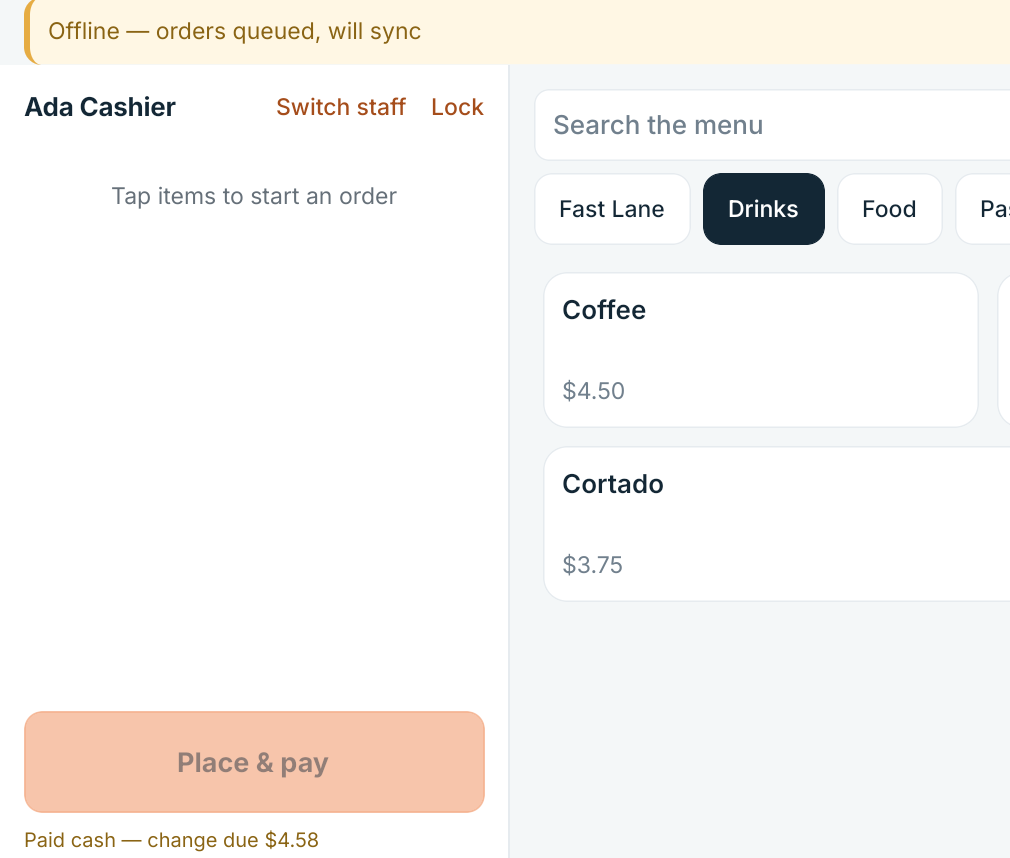
The DineStack register with an offline banner reading orders queued, will sync, and a completed cash sale showing the change due.
What the till looks like with no connection: the state named on screen, orders queued, and a cash sale closed with the change due.

Payment continuity

Payment continuity, and the unknown payment

When the card route is unavailable, the Card button stays on screen, greyed, with the reason on it — and cash and your backup terminal are offered instead.

If a card request goes out and no answer comes back, DineStack stops. It says plainly that we do not know whether the card was charged, and it offers a status check rather than another tender. It will not guess. Charging a guest twice while trying to tidy up an unclear payment is worse than the unclear payment, and a system that silently assumed “probably declined” would do exactly that.
Where cards stand. Card payments run through Stripe Terminal. The server side is live-verified; the reader itself has not yet been certified on our hardware. Recording a payment taken on an independent terminal is built and tested; no physical backup terminal has been run end to end yet.

A backup terminal payment is recorded as somebody’s confirmation that a charge was approved, labelled as exactly that, and counted separately in reconciliation until the terminal’s own batch confirms it.

The same rule runs through the product. A labour cost with no pay rate behind it reads “not known”, not zero. An order whose history cannot be read is quarantined and named rather than counted as a free meal. Where DineStack does not know something, it says so.
Get started